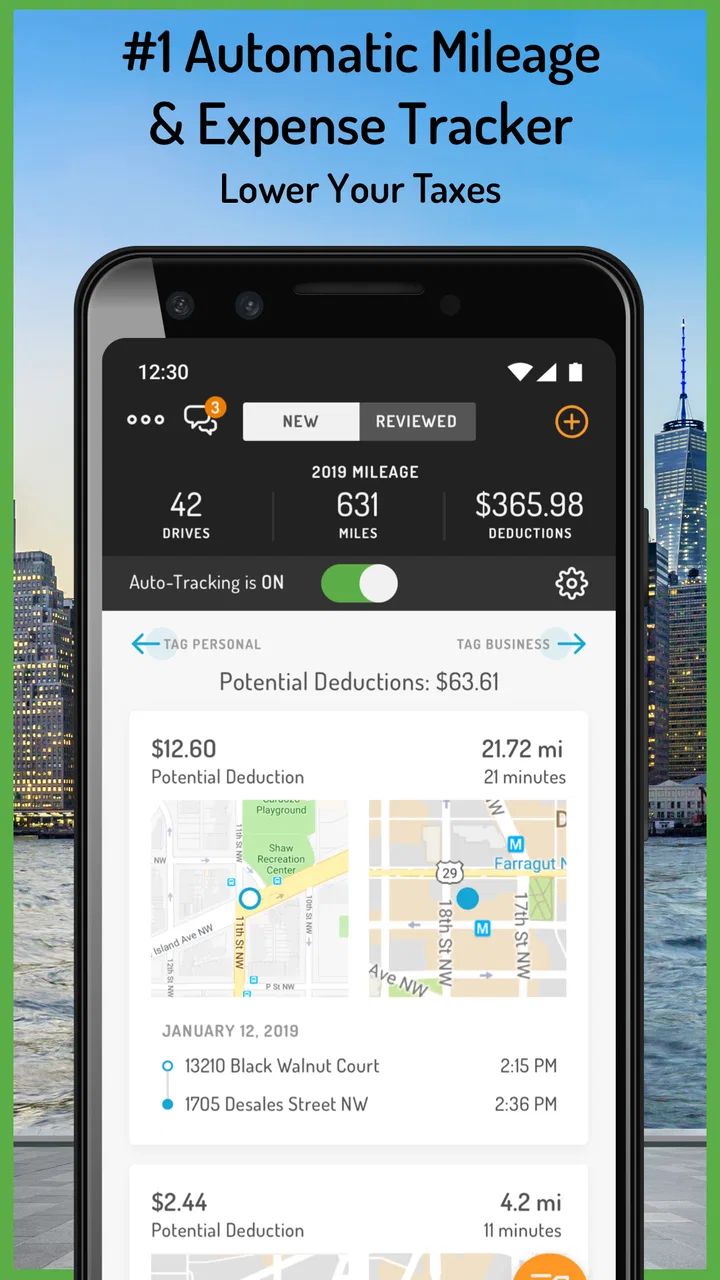
Hurdlr: Mileage, Expense & Tax
- 4.2
- Rating
- 100.00K
- Installs
- Free
- Price

 Analysis by App-foxy
I approached Hurdlr: Mileage, Expense & Tax as a practical finance app for people whose work happens away from a desk. Its purpose is clear: keep an eye on driving, business spending, receipts, and tax-related deductions in one place. After using it with that mindset, I found its biggest value is not flashy budgeting or investment analysis, but reducing the small bits of record-keeping that freelancers, contractors, and independent workers often postpone.
That focus also makes it an interesting app to judge through an accessibility lens. Financial tracking is only useful when I can read the information comfortably, understand what needs attention, and record something quickly in the middle of a busy day. Hurdlr, Inc. has built a tool that can fit into those moments, although it is not equally suitable for every work style. My experience was strongest when I used it as a running log rather than expecting it to replace a full accounting system.
How readable and navigable is the financial workflow?
The first thing I appreciated was the straightforward connection between the app’s main jobs. Mileage, expenses, receipts, and deductions are not presented as unrelated tasks; they belong to the same picture of a self-employed person’s finances. That makes the product easier to understand than a general-purpose money manager when the question is, “What did this work actually cost me, and what should I remember for tax time?”
You May Also Like

 Blood Strike: 2.5 Anniversary
Blood Strike’s Loadouts Turn Every Drop Into a Tactical Gamble
A close look at Blood Strike’s custom loadouts: how fast access to signature weapons reshapes its battle royale rhythm, rewards preparation, and narrows the gap between fights.

 Pandora - Music & Podcasts
Pandora’s Music Is Easy to Start, but Harder to Recover
Pandora’s strength is its low-effort path from a seed to a station. Its weak spot is how much confidence it asks you to place in connection, setup, and quiet recovery.

 8 Ball Pool
 Is Built on Rivalries, Rematches, and Routine
A close look at the rivalries, rematches, shared routines, and unanswered safety questions that turn a quick pool match into a persistent mobile community.

 Samsung Music
’s Quiet Strength Is Playing What You Already Own
Its reach comes less from spectacle than from dependable access to a personal library. That simplicity is both the app’s strongest retention engine and its ceiling.

 AccuWeather: Weather Radar
AccuWeather Review: A Quick, Clear Forecast for Everyday Decisions
For everyday plans, the best forecast is the one you can understand quickly. AccuWeather makes rain timing, radar, and local conditions easy to act on, with a few trade-offs.

 Hill Climb Racing
Why Hill Climb Racing Still Turns Crashes Into One More Run
A tiny car, a bumpy hill and one more upgrade: Hill Climb Racing keeps resurfacing because its simple chaos makes every near-miss feel personal.
More From Our News Desk



For a new user, the best approach is to think in terms of habits rather than setup perfection. I would begin by recording one normal workday, checking how a trip appears, adding one business purchase, and then reviewing the resulting summary. That small test reveals whether the labels and flow make sense before I rely on the app for months of records. It is also a useful way to notice which parts require a second look instead of assuming every entry is automatically classified correctly.
The interface is most helpful when I am already thinking about a specific event. A fuel purchase, a client visit, or a receipt received by email gives me a natural reason to open the app. In contrast, browsing without a clear task can feel less purposeful. This is common with finance tools, but it matters more here because the app’s usefulness depends on consistent, timely input.
I would not describe Hurdlr as a substitute for learning the basics of business expenses. The app can organize information, but I still need to decide whether a purchase relates to work and whether a trip belongs in a business record. That distinction is important for readability too: a clean summary can look reassuring even when the underlying entries need personal judgment.
The product is free to install and sits in the finance category, with optional in-app purchases ranging from $5.99 to $99.99 per item. I would treat the free starting point as a chance to test the workflow, not as a promise that every useful capability will remain available without an upgrade. Before committing to a long-term routine, I would check which tools matter to my particular work pattern and whether they are part of the paid experience.
Reading summaries without losing the detail
One practical strength is the movement between a broad financial view and individual records. I can look at the overall picture, then return to a receipt or expense when something seems unfamiliar. That matters for people who process information better in small pieces. Instead of trying to remember an entire month, I can review one transaction at a time and correct mistakes while the context is still fresh.
There is a trade-off, though. A summary is only as trustworthy as the routine behind it. If I delay entering cash purchases or forget why a trip happened, the app may still present an orderly-looking record that is incomplete. My advice is to schedule a short review at the end of a workday or week. This is less demanding than reconstructing everything from bank statements and scattered photos later.
People with visual fatigue may prefer shorter sessions, larger device text where the operating system supports it, and a quieter environment for reviewing totals. Those adjustments are not special Hurdlr features, but they can make a finance workflow more comfortable. I found that the app is easier to use when I separate quick capture from detailed review instead of trying to do both while rushing between jobs.
Motor, sensory, and attention demands in everyday use
Hurdlr is designed around actions that can happen repeatedly: checking a trip, recording a cost, saving receipt information, and reviewing deductions. That creates a useful opportunity for people who want to replace paper notes with a consistent digital habit. It also creates pressure, because repeated tapping or correcting entries can become tiring if the workflow does not match the way someone works.
For users with limited hand movement or reduced precision, the most comfortable pattern is to use the app when stationary, rather than trying to manage records while walking, driving, or carrying equipment. I would never treat a moving vehicle as an appropriate time to interact with a finance app. A passenger can handle a quick task, but the safer and more inclusive habit is to wait until the trip is over and the phone can be used deliberately.
That recommendation exposes an important distinction: automatic mileage tracking can reduce the need to remember every journey, but it does not remove the need to review the result. Anyone who finds repeated corrections physically tiring should build in a regular review period and keep the number of categories simple. A smaller, consistent routine is more useful than a detailed system that becomes too burdensome to maintain.
For people with hearing-related access needs, the core value of this app is primarily visual and record-based rather than dependent on spoken interaction. I would still judge the experience on whether important information is understandable on screen and whether a user can complete a task without relying on audio cues. In my use, the strongest accessibility choice is the ability to work through written financial records at a chosen pace, although individual comfort will depend on the device and system settings.
Users with cognitive disabilities, attention difficulties, or memory challenges may benefit from treating each entry as a small, repeatable checklist: identify the trip or purchase, decide whether it was work-related, attach the supporting receipt when appropriate, and move on. That approach avoids opening the app with an intimidating goal such as “finish my taxes.” It also makes errors easier to spot because each record has a clear purpose.
A workflow that helps when memory is the main obstacle
The most useful non-obvious insight for me is that the app works best as a memory aid before it becomes a tax-time tool. If I wait until the end of a quarter, I am asking myself to remember locations, reasons for trips, and the business purpose of purchases. Capturing the event close to when it happens preserves context that no later spreadsheet can recreate.
A second useful insight is to separate “capture” from “interpretation.” I can record a receipt or mileage event quickly, then review whether it belongs in a deduction category when I have more attention available. This is especially helpful for users who become overwhelmed by making several decisions at once. The app’s value is not only in storing the record; it is in letting me build a less stressful sequence around the record.
A third trade-off is that automation is most helpful for routine travel, while unusual trips deserve extra scrutiny. A normal pattern between work locations may be easy to recognize, but a mixed personal and business journey can require a human decision. I would never let an automatic log replace my own review of purpose and context. That is good financial practice and also reduces the cognitive burden of correcting a large batch later.
Access in different work and living situations
This app makes the most sense for people who earn money through driving, visiting customers, making deliveries, working from changing locations, or running a small independent service. A contractor who moves between appointments can benefit from having mileage and purchases connected to the same record-keeping habit. A remote freelancer with very few travel expenses may still find receipt and deduction tracking useful, but the mileage side may not justify adding another app to the routine.
Consider a realistic day for a self-employed repair worker. The morning includes a drive to a customer, a purchase of supplies, and an afternoon visit to another address. Without a dedicated system, the worker might keep a receipt in a pocket, rely on memory for the distance, and promise to update a spreadsheet at night. Hurdlr can make that day easier by giving each event a place to land. The real benefit appears later, when the worker can review the day without sorting through unrelated personal spending.
For someone who works in noisy environments, the practical solution is to postpone detailed review until a quieter place. A receipt can be captured as part of the routine, while classification and checking happen later. This two-stage method supports people who have difficulty concentrating amid traffic, customers, machinery, or constant interruptions.
For users with inconsistent internet access or limited data, I would test the app during the exact conditions in which it will be used. A finance routine that works perfectly at home may feel less dependable on the road if the user expects every action to update immediately. I would avoid promising myself that I will “fix it later” unless I have a reliable backup habit, because delayed entry is where records tend to disappear.
People who share devices or need strong separation between personal and work information should also think through their routine before adopting it. The app is centered on business records, but the phone itself may contain personal notifications, photos, and accounts. A private review space, a screen lock, and a deliberate receipt-handling habit are sensible safeguards for anyone managing sensitive financial material.
Who will find the app comfortable, and who may prefer another tool?
I would recommend it first to a self-employed person who wants less manual mileage and expense administration, is comfortable reviewing automated records, and does not need a full accounting package. It is also a reasonable starting point for someone who has been using paper envelopes or scattered phone photos and wants a single place to develop better habits.
I would be more cautious for a small company with several employees, complex invoicing, inventory, payroll, or extensive collaboration needs. In that situation, a dedicated accounting platform may provide a broader structure, even if it requires more setup. Likewise, someone who only wants a simple monthly budget may find Hurdlr too specialized; a conventional budgeting app could be clearer for household income and bills.
Another important question is whether the user wants control over every detail. Hurdlr’s appeal comes partly from reducing manual work, but people who prefer building their own spreadsheet may dislike automated categorization or recurring review. A spreadsheet offers flexibility and transparency, while this app offers a more focused workflow for mileage and business deductions. The better choice depends on whether convenience or complete customization matters more.
Remaining barriers before making it a daily habit
The main barrier is not a lack of purpose; it is the discipline required to keep records accurate. Mileage and receipts can become complicated when work and personal activities overlap. The app can help organize those situations, but it cannot make the underlying decision for me in a way that removes responsibility. I still need to inspect unusual entries and retain the supporting information that makes a record meaningful.
Another limitation is the possibility of feature boundaries between the free experience and paid options. Since the app is free with optional purchases, I would avoid designing my entire financial process around a premium function until I had confirmed that the cost fits my needs. The listed paid-item range extends from $5.99 to $99.99, so the difference between a casual trial and a long-term commitment may be significant for a new freelancer watching every expense.
There is also a learning curve in deciding how much detail is enough. Too little information makes a record hard to explain later; too much information slows down capture. I found the best balance was to note the business purpose in plain language and attach the relevant receipt, then reserve deeper cleanup for a scheduled review. That approach is more sustainable than trying to create perfect entries while distracted.
Readers may wonder whether the app is suitable for tax filing itself. I see it as a preparation and organization tool rather than a replacement for personal tax judgment or professional advice. It can help gather the mileage, expenses, receipts, and deduction records I need to review, but I would still check current rules and ask a qualified professional about complicated situations.
Another common concern is whether an app like this is useful without frequent driving. My answer is yes, but only if business expenses and receipts are a meaningful problem. A desk-based consultant with occasional purchases may gain more from a simple expense tracker, while a delivery worker or mobile service provider is much more likely to feel the benefit of mileage-focused organization.
Finally, users may ask whether it is appropriate for older adults or people who are not confident with finance apps. I would introduce it gradually: one expense, one receipt, one trip, and one review screen at a time. The Everyone age rating makes it broadly approachable, but age suitability is not the same as effortless use. A family member, bookkeeper, or trusted adviser may need to help establish the initial routine without taking over the user’s financial decisions.
My inclusive verdict on Hurdlr
Hurdlr, Inc. has created a focused finance app that can make self-employed record keeping feel less scattered. Its strongest contribution is bringing mileage, expenses, receipts, and tax-deduction preparation into a workflow that fits mobile work. With an average rating of 4.2 from around 9 thousand ratings and over 100 thousand installs, it has clearly attracted a substantial audience, while its long availability since August 6, 2015, gives it a more established feel than a brand-new experiment.
The current version is 42.2.5 and supports devices running at least OS 9. Those details matter for accessibility in practice: before recommending it to someone using an older phone, I would check compatibility and make sure the device remains comfortable for reading and touch interaction. A well-organized finance routine cannot compensate for a screen that is difficult to see or a device that struggles during everyday use.
My final recommendation is conditional but positive. Choose Hurdlr if your main problem is remembering work miles and keeping business receipts together. Use it in short, predictable sessions, review automated records instead of trusting them blindly, and separate quick capture from detailed checking. That combination makes the app more usable for different attention levels, work environments, and physical abilities.
I would skip it if I only needed household budgeting, demanded a complete business accounting suite, or disliked any workflow that asks me to review automated information. For everyone else, especially mobile workers and independent contractors, it is a sensible free starting point with optional paid upgrades. It will not remove every financial decision, but in my experience it can remove enough repetitive remembering to make accurate record keeping feel achievable.
FAQs for Hurdlr: Mileage, Expense & Tax
01What is Hurdlr: Mileage, Expense & Tax used for?
Hurdlr is designed for freelancers, independent contractors, small-business owners, and gig workers who need to track business mileage, expenses, income, and estimated taxes in one place. During testing, its main benefit was reducing manual recordkeeping by organizing financial activity and helping users understand how much money may be available after expenses and tax obligations.
02How does Hurdlr track mileage and is it accurate?
Hurdlr can automatically record driving trips using your phone’s location services, while also offering options to classify trips as business or personal and add mileage manually when needed. Accuracy depends on GPS reception, battery settings, and whether background location access is enabled. Before relying on the records for tax purposes, review trips regularly and correct missing or incorrectly categorized journeys.
03Does Hurdlr connect to bank accounts and financial services?
The app may connect with supported banks, credit cards, payment platforms, or other financial services to import transactions and help identify business income and expenses. Availability can vary by country, institution, subscription plan, and provider support. You should check the connection list before downloading, and remember that imported transactions still need occasional review because automatic categorization is not always perfect.
04Can Hurdlr calculate taxes and replace an accountant?
Hurdlr can estimate taxes by using information such as income, deductible expenses, mileage, and the tax settings you provide. This makes it useful for planning and setting money aside throughout the year, but it should not be treated as a replacement for a qualified tax professional. Tax rules differ by location and personal circumstances, so verify important calculations before filing or making payments.
05Is Hurdlr free, and what should I know about privacy and battery use?
Hurdlr may offer a free version or trial, while advanced features such as automatic mileage tracking, expanded reports, integrations, or tax tools can require a paid subscription. Review the current pricing and renewal terms in the Google Play Store or App Store before subscribing. Because mileage tracking may use background location, the app can affect battery life and requires careful review of its privacy permissions.
Pros
- Automatically tracks trips with accurate mileage records.
- Supports expense tracking alongside mileage data.
- Provides tax estimates for freelancers and small businesses.
- Can categorize trips as business or personal.
- Exports reports useful for accountants and tax preparation.
Cons
- Some advanced tax features require a paid subscription.
- Automatic tracking may reduce battery life during frequent driving.
- Tax calculations depend on accurate user-entered information.
- The interface can feel complex for occasional users.
- Coverage and tax tools may vary by country or region.

Hurdlr: Mileage, Expense & Tax
Gallery